Be yourself; Everyone else is already taken.
— Oscar Wilde.
This is the first post on my new blog. I’m just getting this new blog going, so stay tuned for more. Subscribe below to get notified when I post new updates.
software development engineering
Be yourself; Everyone else is already taken.
— Oscar Wilde.
This is the first post on my new blog. I’m just getting this new blog going, so stay tuned for more. Subscribe below to get notified when I post new updates.

If you are here and don’t have any idea about what we are talking about, so, Let’s define some terms before we start
What is a Compiler? It is a program that takes an input called high-level programming language and translate into an output called lower level language with the purpose to create a executable program. This applies to computer programs.
Into the compilation process occurs 4 sub-process called: Preprocessor, compiler, assembler and linker.

Preprocessor: It is ensured that all files are necessary taken to the compiler.
Compiler: Translates a high level language into machine code .
Assembler: Translate assembly intermediate files into a native assembly
Linker: Create an executable file.
now! what we came here? ahhh! what happens when you type gcc main.c?
but, What’s gcc? is a GNU compiler Collection. A compiler system produced by GNU project. And What’s main.c? In this case is the program(into a file for language C, for that reason the extension is .c) that we are going to convert into an executable.
Let’s see an example: we have the file main.c in our pc. In that file we write a program in C language that print the abc in lowercase and uppercase.

and now we are write gcc main.c in the terminal

after that, the command gcc create a new fille called a.out. The file a.out is the executable, is the result of the compiler.

now, we execute the file a.out with the line ./a.out
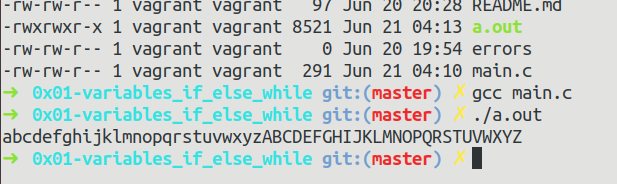
finally the program was executed and we have the result in the terminal, you can see the abc in lowercase and uppercase.

Hard Link: is an entry that associates a name with a file. if we have a file . If we create a hard link to the file and then delete the file, we can still access the file using hard link
Symbolic Link or Soft Link: is like a shortcut feature which is used in Windows systems. contains the path not the content of a file.
What’s Link? in Linux is a pointer to a file. Links allow more than one file name to refer to the same file.
How create a hard link:
| ln {source} {link} source is an existing file and link es the file to create |
How to create a symbolic link:
ln -s {source_file} {link}
source_file name of existing file and link es the file to create

ls *.c is a command to list all files and directories in the current directory that finish with extension .c it’s used into many linux/unix distribution.

BUT, NOW! What’s current directory? What’s extention? what’s linux/unix distribution? What’s the mean of character * ?
Current directory: is a process in a hierarchical file system.
Extension: identifier of a file in an operating system.
Linux/Unix: are open source operating systems.
Character * : into linux/unix means match any characters in a filename
This is an example post, originally published as part of Blogging University. Enroll in one of our ten programs, and start your blog right.
You’re going to publish a post today. Don’t worry about how your blog looks. Don’t worry if you haven’t given it a name yet, or you’re feeling overwhelmed. Just click the “New Post” button, and tell us why you’re here.
Why do this?
The post can be short or long, a personal intro to your life or a bloggy mission statement, a manifesto for the future or a simple outline of your the types of things you hope to publish.
To help you get started, here are a few questions:
You’re not locked into any of this; one of the wonderful things about blogs is how they constantly evolve as we learn, grow, and interact with one another — but it’s good to know where and why you started, and articulating your goals may just give you a few other post ideas.
Can’t think how to get started? Just write the first thing that pops into your head. Anne Lamott, author of a book on writing we love, says that you need to give yourself permission to write a “crappy first draft”. Anne makes a great point — just start writing, and worry about editing it later.
When you’re ready to publish, give your post three to five tags that describe your blog’s focus — writing, photography, fiction, parenting, food, cars, movies, sports, whatever. These tags will help others who care about your topics find you in the Reader. Make sure one of the tags is “zerotohero,” so other new bloggers can find you, too.

 What happens when you type ls *.c